Sparrow Industries is Virtual Company located and runs under Second Life TOS, established on October, 7th in 2006. Company provides advanced hi-tech Security Systems and Protection for Lands, Land Products for virtual enviroments, Shoutcast and Icecast and Club Equipment, Avatar Accessories, Scripted Agents - Robobuddies, and many many more... With 18 employees we provide the best Customer Support.
Showing posts with label Avatar Accessories. Show all posts
Saturday, February 23, 2013
Monday, February 11, 2013
Friday, November 2, 2012
Uzi MAG10 (BNWCS - DCS 2.0)
Sparrow Industries - Impact Weapons Tech
http://www.sparrowindustries.net
INTRO
Sparrow Industries SPI engine designed to work perfect with the most combat engines are available in the second life. With advanced scripting techniques and very nice and sculpted models, we succeed to release those series of weapons with low price and high quality. Those weapons are not designed for grieffing or disturbing the world of second life, but to give accurate shots and abilities to mod the settings for maximum performance during your RP war game.
FEATURES
• High Precise Targeting
• HD Bullets Phys
• High damage for BNWCS and DSC2.0 combat systems
• Adjustable Rate of fire. (1-10 bullets per second)
• Adjustable bullet speed (100 – 250 meters per second)
• 3 Modes(Single, Burst, Auto )
• Advanced Cross shooting system for higher rate of shooting
• Recolor parts*
• Gestures for fast draw and holster modes
• 200 Bullets Magazines
• Silencer
• High Precise Targeting
• HD Bullets Phys
• High damage for BNWCS and DSC2.0 combat systems
• Adjustable Rate of fire. (1-10 bullets per second)
• Adjustable bullet speed (100 – 250 meters per second)
• 3 Modes(Single, Burst, Auto )
• Advanced Cross shooting system for higher rate of shooting
• Recolor parts*
• Gestures for fast draw and holster modes
• 200 Bullets Magazines
• Silencer
MODES
SINGLE
While your weapon is in single mode, it will fire only 1 bullet per click. The bullet will not use the cross fire technique and will fire up from the middle for the best accurate targeting. Best usages for long distance sharp shoots.
BURST
When you set Burst mode, the weapon will fire up 3 bullets per 1 click. Non cross technique. This mode is perfect for better controlling the magazine’s remaining bullets.
AUTO
In this mode, the bullets are unleashed. Automatic mode will keep firing up bullets as long you hold the mouse button pressed. Cross firing also enabled for fastest bullet rezzing.
SINGLE
While your weapon is in single mode, it will fire only 1 bullet per click. The bullet will not use the cross fire technique and will fire up from the middle for the best accurate targeting. Best usages for long distance sharp shoots.
BURST
When you set Burst mode, the weapon will fire up 3 bullets per 1 click. Non cross technique. This mode is perfect for better controlling the magazine’s remaining bullets.
AUTO
In this mode, the bullets are unleashed. Automatic mode will keep firing up bullets as long you hold the mouse button pressed. Cross firing also enabled for fastest bullet rezzing.
RATE OF FIRE EXPLAINED
Rate of fire means how many bullets per one second will released from the weapon. 1 b/s means that will fire 1 bullet every 1 second. That means as higher the ROF is more bullets will shot per second. The most of the RP sims allow weapons up to 8 or 10 b/s. Higher rates will cause extremely lag during shooting.
VELOCITY OR BULLET SPEED EXPLAINED
Higher speed means faster bullets. Depends of the usage of your weapon you have to test and adjust those settings for the maximum performance of your weapon. The measurement of these settings counts on M/s (Meters per second). If you going to use the weapon for close targets, you should keep this setting low (100-125 m/s), but if you want to use it on long distance shoots you should use faster bullets (200-250 m/s).
CROSS FIRE EXPLAINED
Weapons using physical prims known as bullets fired to the target with high speed. Because of the continuously and rapid rezing of the bullets causing collision between the bullets when they are rezed in straight line. Cross Firing means that the bullets will not been fired in straight line but with an offset to left and right on each bullet. That prevents the colliders to impact when your weapon used in automatic mode. This mode will relax the sim’s colliders and the LAG will gone.
Link Gun (BNWCS, DCS 2.0)
Sparrow Industries - Impact Weapons Tech
http://www.sparrowindustries.net
INTRO
Sparrow Industries SPI engine designed to work perfect with the most combat engines are available in the second life. With advanced scripting techniques and very nice and sculpted models, we succeed to release those series of weapons with low price and high quality. Those weapons are not designed for grieffing or disturbing the world of second life, but to give accurate shots and abilities to mod the settings for maximum performance during your RP war game.
FEATURES
• High Precise Targeting
• HD Bullets Phys
• High damage for BNWCS and DSC2.0 combat systems
• Adjustable Rate of fire. (1-10 bullets per second)
• Adjustable bullet speed (100 – 250 meters per second)
• 3 Modes(Single, Burst, Auto )
• Advanced Cross shooting system for higher rate of shooting
• Recolor parts*
• Gestures for fast draw and holster modes
• 200 Bullets Magazines
• Silencer
• High Precise Targeting
• HD Bullets Phys
• High damage for BNWCS and DSC2.0 combat systems
• Adjustable Rate of fire. (1-10 bullets per second)
• Adjustable bullet speed (100 – 250 meters per second)
• 3 Modes(Single, Burst, Auto )
• Advanced Cross shooting system for higher rate of shooting
• Recolor parts*
• Gestures for fast draw and holster modes
• 200 Bullets Magazines
• Silencer
MODES
SINGLE
While your weapon is in single mode, it will fire only 1 bullet per click. The bullet will not use the cross fire technique and will fire up from the middle for the best accurate targeting. Best usages for long distance sharp shoots.
BURST
When you set Burst mode, the weapon will fire up 3 bullets per 1 click. Non cross technique. This mode is perfect for better controlling the magazine’s remaining bullets.
AUTO
In this mode, the bullets are unleashed. Automatic mode will keep firing up bullets as long you hold the mouse button pressed. Cross firing also enabled for fastest bullet rezzing.
SINGLE
While your weapon is in single mode, it will fire only 1 bullet per click. The bullet will not use the cross fire technique and will fire up from the middle for the best accurate targeting. Best usages for long distance sharp shoots.
BURST
When you set Burst mode, the weapon will fire up 3 bullets per 1 click. Non cross technique. This mode is perfect for better controlling the magazine’s remaining bullets.
AUTO
In this mode, the bullets are unleashed. Automatic mode will keep firing up bullets as long you hold the mouse button pressed. Cross firing also enabled for fastest bullet rezzing.
RATE OF FIRE EXPLAINED
Rate of fire means how many bullets per one second will released from the weapon. 1 b/s means that will fire 1 bullet every 1 second. That means as higher the ROF is more bullets will shot per second. The most of the RP sims allow weapons up to 8 or 10 b/s. Higher rates will cause extremely lag during shooting.
VELOCITY OR BULLET SPEED EXPLAINED
Higher speed means faster bullets. Depends of the usage of your weapon you have to test and adjust those settings for the maximum performance of your weapon. The measurement of these settings counts on M/s (Meters per second). If you going to use the weapon for close targets, you should keep this setting low (100-125 m/s), but if you want to use it on long distance shoots you should use faster bullets (200-250 m/s).
CROSS FIRE EXPLAINED
Weapons using physical prims known as bullets fired to the target with high speed. Because of the continuously and rapid rezing of the bullets causing collision between the bullets when they are rezed in straight line. Cross Firing means that the bullets will not been fired in straight line but with an offset to left and right on each bullet. That prevents the colliders to impact when your weapon used in automatic mode. This mode will relax the sim’s colliders and the LAG will gone.
Assault M4A1 (BNWCS, DCS 2.0)
Sparrow Industries - Impact Weapons Tech
http://www.sparrowindustries.net
INTRO
Sparrow Industries SPI engine designed to work perfect with the most combat engines are available in the second life. With advanced scripting techniques and very nice and sculpted models, we succeed to release those series of weapons with low price and high quality. Those weapons are not designed for grieffing or disturbing the world of second life, but to give accurate shots and abilities to mod the settings for maximum performance during your RP war game.
FEATURES
• High Precise Targeting
• HD Bullets Phys
• High damage for BNWCS and DSC2.0 combat systems
• Adjustable Rate of fire. (1-10 bullets per second)
• Adjustable bullet speed (100 – 250 meters per second)
• 3 Modes(Single, Burst, Auto )
• Advanced Cross shooting system for higher rate of shooting
• Recolor parts*
• Gestures for fast draw and holster modes
• 200 Bullets Magazines
• Silencer
• High Precise Targeting
• HD Bullets Phys
• High damage for BNWCS and DSC2.0 combat systems
• Adjustable Rate of fire. (1-10 bullets per second)
• Adjustable bullet speed (100 – 250 meters per second)
• 3 Modes(Single, Burst, Auto )
• Advanced Cross shooting system for higher rate of shooting
• Recolor parts*
• Gestures for fast draw and holster modes
• 200 Bullets Magazines
• Silencer
MODES
SINGLE
While your weapon is in single mode, it will fire only 1 bullet per click. The bullet will not use the cross fire technique and will fire up from the middle for the best accurate targeting. Best usages for long distance sharp shoots.
BURST
When you set Burst mode, the weapon will fire up 3 bullets per 1 click. Non cross technique. This mode is perfect for better controlling the magazine’s remaining bullets.
AUTO
In this mode, the bullets are unleashed. Automatic mode will keep firing up bullets as long you hold the mouse button pressed. Cross firing also enabled for fastest bullet rezzing.
SINGLE
While your weapon is in single mode, it will fire only 1 bullet per click. The bullet will not use the cross fire technique and will fire up from the middle for the best accurate targeting. Best usages for long distance sharp shoots.
BURST
When you set Burst mode, the weapon will fire up 3 bullets per 1 click. Non cross technique. This mode is perfect for better controlling the magazine’s remaining bullets.
AUTO
In this mode, the bullets are unleashed. Automatic mode will keep firing up bullets as long you hold the mouse button pressed. Cross firing also enabled for fastest bullet rezzing.
RATE OF FIRE EXPLAINED
Rate of fire means how many bullets per one second will released from the weapon. 1 b/s means that will fire 1 bullet every 1 second. That means as higher the ROF is more bullets will shot per second. The most of the RP sims allow weapons up to 8 or 10 b/s. Higher rates will cause extremely lag during shooting.
VELOCITY OR BULLET SPEED EXPLAINED
Higher speed means faster bullets. Depends of the usage of your weapon you have to test and adjust those settings for the maximum performance of your weapon. The measurement of these settings counts on M/s (Meters per second). If you going to use the weapon for close targets, you should keep this setting low (100-125 m/s), but if you want to use it on long distance shoots you should use faster bullets (200-250 m/s).
CROSS FIRE EXPLAINED
Weapons using physical prims known as bullets fired to the target with high speed. Because of the continuously and rapid rezing of the bullets causing collision between the bullets when they are rezed in straight line. Cross Firing means that the bullets will not been fired in straight line but with an offset to left and right on each bullet. That prevents the colliders to impact when your weapon used in automatic mode. This mode will relax the sim’s colliders and the LAG will gone.
Thursday, November 1, 2012
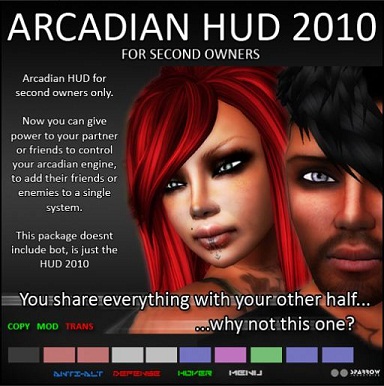
Arcadian HUD for Second Owners
Arcadian HUD 2010 for Second Owners
WARNING: Second-owner HUD means that you are not the owner of the bot
and that you will have limited abilities. Owner of this Second owner
HUD can use it only with his partners or friends Sparrow Sceurity bots
if they allow that.
After unpacking the Arcadian HUD 2010 for second owners to your
inventory, right click and choose wear. Do not rez the HUD to the floor
or change HUD area to wear it on because the HUD may not work properly.
To be able to connect, you and the owner of the bot must to add each other names in the "Lists" under "Owners".
Once you are wearing the HUD right click the HUD and go to edit then click the contents tab. Here you will find the note called Lists. Do not open or try to open anything else and do NOT remove anything from here or you will break it. Open the Lists note and you will have 4 sections: allow list, attack list, positions URL and owners.
To be able to connect, you and the owner of the bot must to add each other names in the "Lists" under "Owners".
Once you are wearing the HUD right click the HUD and go to edit then click the contents tab. Here you will find the note called Lists. Do not open or try to open anything else and do NOT remove anything from here or you will break it. Open the Lists note and you will have 4 sections: allow list, attack list, positions URL and owners.
After adding names, click on save and you will get confirmation that list is received and installed:
Sparrow HUD 2010: Loading Allow List
Sparrow HUD 2010: Loading Attack List
Sparrow HUD 2010: Loading Positions List
Sparrow HUD 2010: Loading Second Owners List
Sparrow HUD 2010: Loading Complete
Then click on the rezzed bot and click on menu and it should appear there.
Now you are ready to operate with this bot.
Sparrow HUD 2010: Loading Allow List
Sparrow HUD 2010: Loading Attack List
Sparrow HUD 2010: Loading Positions List
Sparrow HUD 2010: Loading Second Owners List
Sparrow HUD 2010: Loading Complete
Then click on the rezzed bot and click on menu and it should appear there.
Now you are ready to operate with this bot.
Yours,
Sparrow Industries Team
http://slurl.com/secondlife/Kimberley/177/189/27
Sparrow Industries Team
http://slurl.com/secondlife/Kimberley/177/189/27
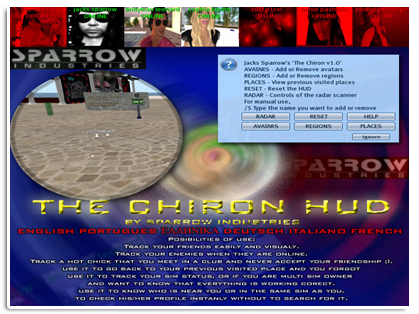
The Chiron HUD
| Dodaj naslov |
The Chiron v1.3
By Sparrow Industries
==================================
By Sparrow Industries
==================================
What is this?
“Chiron HUD” is the 1st Multiuse Sparrow Gadget that includes several options to track someone or to be very useful in some situations. As many of you know, Sparrow Industries prefer to sell products with style which means - we never going to give you a product that just showing indicators with simple lines like, products you (maybe/already) have.
All your friends or enemies will be showing on top of your screen with pull down profile pictures and online status. Online status is easy to indentify (green – online and red – offline).
What the system provides is – you are able to see friends or enemies online status even if they are NOT in your friends list. Important thing is that he/she will never know if you track their status on your hud. Even if they are banning you or make their status appear offline, you will still be able to see if they are online or offline.
In the package you will found the main Chiron HUD and a gesture and it is important to wear both items.
“Chiron HUD” is the 1st Multiuse Sparrow Gadget that includes several options to track someone or to be very useful in some situations. As many of you know, Sparrow Industries prefer to sell products with style which means - we never going to give you a product that just showing indicators with simple lines like, products you (maybe/already) have.
All your friends or enemies will be showing on top of your screen with pull down profile pictures and online status. Online status is easy to indentify (green – online and red – offline).
What the system provides is – you are able to see friends or enemies online status even if they are NOT in your friends list. Important thing is that he/she will never know if you track their status on your hud. Even if they are banning you or make their status appear offline, you will still be able to see if they are online or offline.
In the package you will found the main Chiron HUD and a gesture and it is important to wear both items.
Possibilities?
With
“Chiron HUD”, like we already said, you are able to track your friends
easy and visually and to check profile instantly without to search for
it, and not only friends. You can track your enemies or hot chick that
you meet in club ;-) (And she didn’t accept your friendship). The best
thing is that “Chiron HUD” is easy to use. You only need to add or
remove avatars names. When you add and avatar name his/her small profile
picture will show up on the top of your screen, with online status. If
you add more than 16 avatars top panel will switch to next 16, and after
20 seconds will repeat until all the avatars showing on your screen.
You are able to add avatars name in 2 ways: 1st way – to be near him/her
and to choose option “AVATARS>ADD”, after that blue screen will pop
down with nearby names, or 2nd way – simple to type /5 the name of
avatar. Once when you add avatar with simply click on his/her picture
you will get menu via web browser.
“REGION”
option allows you to track regions online status of your property or
your favorite places. With this it is easy to know if the region is
online or offline. Only you need to add region and when there is a
region change state like GOIN DOWN or OFF LINE the system will notify
you with a command line prompt and a sound alarm. This is great option
for multi sim owner, because any time you are able to check if
everything working correct.
Use
“Chiron HUD” to go back to your previous visited place if you, for some
reasons, forgot to save LM. System automatically tracks every place
that you visited, so you always have possibility to go again to a place
with 2 simple clicks. It will bring you not only to the sim, it will be
exactly on the position where you were before you teleport out.
Also
here you will find 2 types of radar. One is local - 96m range – and
second - the sim range with 255m range. When you activating the radar, a
radar hud will drop drown from the left of your screen with all the
nearby avatars showing. If you switch it to SIM-RANGE then the radar
ratio will go from 96m to 255 display panel, and 4 satellites will
released. You will notice the power of the radar to start going up and
up till reach the 100% of his powers that means all the satellites went
to their correct positions and have start transmitting back you. In some
regions where there is no object allowed, the radar maybe reach the
100% of his power.
So,
because Sparrow Industries keep providing the best solutions on many
aspects of Second life and because is mainly focused on protection the
“Chiron HUD” is what an avatar MUST have to be able to be safe from
unexpected conditions.
Inspect Shield
You can see the dissatisfaction in the eyes of their partners, giving your friends the same clothes and haircuts the day after?
Nothing is more worse than jelaous people who try to imitate you.
You want TO be finally unique, so you can enjoy flirting and attention???
The Inspect Shield is the perfect solution!
You wear it , without others seeing it. But with one big difference: no one can inspect you, so they can not see what you wear nor where it came from.
Let them guess where you buy your stuff , you will stay unique!!!
With Sparrow Inspect Shield you will keep your fashion sources from unwanted spies.
This shieled automaticaly covers you when you sit.
Has three sizes: Small, Midium and Large.
For best fit there are 8 different shapes.
Visit Sparrow shop and you will see how intelligent solutions they have...
This shieled automaticaly covers you when you sit.
Has three sizes: Small, Midium and Large.
For best fit there are 8 different shapes.
Visit Sparrow shop and you will see how intelligent solutions they have...
Subscribe to:
Posts (Atom)