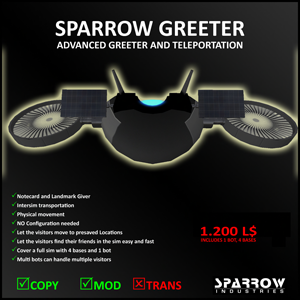
Greetings in style and personalized way.
Sparrow
Greeter fully automated system that provides speed and security to move
to desired locations around your land and sim. Displays dialog box
allowing flexibility in sending information such as landmarks, note
cards, and the sending of greetings to his visitors. Send greetings to
visitors in style, class, agility and personalized way with the Sparrow
Greeter.
Sparrow Greeter Bot By SPARROW INDUSTRIES
Introduction
Sparrow
Greeter bot is a fully automated system for visitor helping move around
your land or Sim. Many Sims are spitted into areas (Clubs, Malls etc)
and the people that comes for 1st time they have to search for each
location. With this bot they simply can sit and select the location they
want to move. Also they can select from the avatar list the person they
want to visit.
Setting up
The
setup is very easy for the Greeter Bot. After you unboxed the product
you will find 1 bot and 4 bases. Each base is equipped with radar. If
your area is small then you will need only 1 base, but in case you want
to cover a whole sim, then you need to place the 4 bases. Each base can
cover 192m in cycle where the center of that cycle located at the center
of the base. So 192m is the diameter of the cycle. After you setup the
bases, you can rez a bot. The bot after is rezzed will start the
identification of the area, locate the boarders and put himself in
single mode. If you rez another one then the 2 bots will communicate and
will both enter in multi mode. In single mode the bot will try to serve
all the visitors, but when more than 1 bot is rezzed then they will
split the visitors for more fast service. There is no limit of how many
bots will be rezzed, but each bot must have 1 base to go for landing
after finish his tasks. When a bot goes to multi mode, and then is not
possible to return back to single mode. To do that you will have to
reset the scripts inside the bot and the base.
How is working
When
the system is placed, you will need a minimum 1 base and 1 bot active.
When someone enters your area, the base will identify him as visitor and
will send the report to the bot. The bot then will start to hover and
fly toward his location. The bot will automatically enter in follow mode
and will send the welcome message telling him to sit on the bot. After
the avatar sits on the bot, the bot will open a dialog with actions. The
visitor is free to choose any of the available actions as example
“Locations”. After the visitor choose the desired location he want to
visit the bot will start traveling to the location and upon arrival, he
will unsit the visitor and heading to the next task. If there is no
tasks available then the bot will move to the nearest available base to
land.
Dialog box
The
Dialog box comes with the following actions: LANDMARK, NOTECARD,
AVATARS, LOCATIONS and NO THANKS. Here we will describe what is each
one.
LANDMARK:
The bot sends your landmark from the bots inventory. Be sure to have 1
landmark inside your bot. To do that you have to remove the sparrow
industries landmark from insides bots inventory and put your own.
NOTECARD:
The bot sends your notecard from the bots inventory. Be sure to have 1
notecard inside your bot. To do that you have to remove the sparrow
industries notecard from insides bots inventory and put your own.
AVATARS:
After the visitor press that function then another one blue dialog will
appear with the avatars are inside the area and then the visitor can
select to witch avatar wants to visit.
LOCATIONS: After the visitor
press that function then another one blue dialog will appear with the
pre-saved locations and then the visitor can select to witch avatar
wants to visit.
NO THANKS: If the visitor selects that option the bot will hover up and continue with the next task.
How to save locations
The
saved locations are not landmarks. To save a location then you will
need to edit the zzSettings notecard inside the bot. there you will see
there is lines and some lines starting with the word “Location=”. You
have to remove all the pre-saved locations and put yours. To add a new
locations you simply move your avatar to the area and check the sims
coordinates located at your upper of your screen, next to the lands
name. The coordinates are 3 numbers identifying your position inside the
sim (x, y and z). So if you want to save a location easy type Location=NAME@<87,160,29 > where the name is a name of your choice for the location and then the coordinates of the location, and save the notecard.
Other settings located in the zzSettings
Inside the zzSettings notecard you will notice that there is some other settings. Those settings are for several actions.
welcome message: is the message that send to each visitor comes to your land.
Sounds=on/off: this options turns the engines sounds on or off.
Soundsvolume=0.2: this is the level of the volume the engines will run. Values (0.0 to 1.0)
voice=on/off: this options turns the voice sounds on or off.
voicevolume=0.4: this is the level of the volume the voice. Values (0.0 to 1.0)
Voice
Inside
the bot there is a script with name “Voice Controller”. That Script is a
plugin that makes the bot able to say the messaged in voice. In the
near future more voices will become available and when you want to use a
different voice then you have to replace that script with the new one.
Epilogue
After
many years of experience and production, Sparrow Industries again comes
with something unique and stylish. Greeter Bot is very promising and
can easy amaze your friends with his movement. There will be many
plugins in the future that allows you to have group inviters etc. This
is the beginning of a new, stylish and very promising product. As we
know Sparrow Industries always puts higher standards for the market and
this is the future of the Teleportation and visitor helping. Thank you
for choosing stylish for your visitors.
So why to have something less than a Sparrow product?
Sparrow Industries