Showing posts with label Turret. Show all posts

Friday, November 9, 2012

Arcadian Pack with 50% Discount for Weekend

Weekend Special Offer - 50 % Discount


This weekend Arcadian Pack on Weekend Special Offer! 50% Discount! For members of Sparrow Industries group wearing group tag there is additional 50%. If you use Special Offer vendor the price drops for new 25%...Do not miss this opportunity! Offer Includes:
▶Arcadian - Arcadian Defensive System
▶ HunterKiller Arcadian - Arcadian Defensive System
▶LandKeeper - Arcadian Defensive System
▶ Zoed - Arcadian Defensive System
▶Martian Force - Arcadian Defensive System
▶Spirit - Arcadian BotWars
▶Daemon - Arcadian BotWars
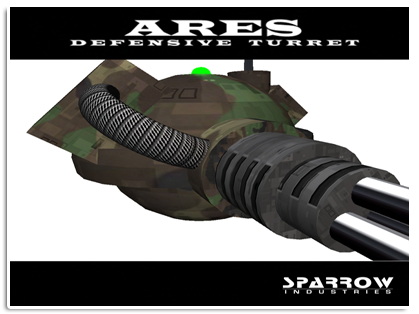
▶Ares Turret
This special offer ends on Sunday, 11th!! (Second Life Midnight).
Yours,
Sparrow Industries Team
For more information visit Sparrow Industries Main Store @ Kimberley!

Friday, November 2, 2012

Arcadian Engine Pack

Arcadian Engine Pack Contains 8 Security Systems with Arcadian Engine:
▶Arcadian - Arcadian Defensive System
▶ HunterKiller Arcadian - Arcadian Defensive System
▶LandKeeper - Arcadian Defensive System
▶ Zoed - Arcadian Defensive System
▶Martian Force - Arcadian Defensive System
▶Spirit - Arcadian BotWars
▶Dameon - Arcadian BotWars
▶Ares Turret

For more informations about each you can visit Sparrow marketstore at https://marketplace.secondlife.com/stores/10132, web site: www.sparrowindustries.net or our in worls shop at
http://slurl.com/secondlife/Kimberley/154/171/27

Your,
Sparrow Industrie Team

Sparrow Security Affiliate - Level 2

********************************
Visit our website at
http://www.sparrowindustries.net
********************************
Sparrow Industries Affilate vendor
Hello everyone, first i want to thank you for stop and check this!!!
Sparrow industries is an active and healthy company in secondlife who is specialized on security bots. The company exists for 2 years and me the owner i thing it is time to give the opurtunity to help you make some profits!!!
All the security bots are pricey items, so dont be scared about the amount of the vendor price, as example the arcadian cost 1.400l$ and you keep 560$ for every sale. That means you need only 27 sales to take your money back.
This is not a purcharce , actualy is an investment !!! cause the vendor includes ALL current and FUTURE Land security products!!!!
1st level (20%): Arcadian 1.400l$, you keep 280l$, got your money back after 18 sales
2nd Level (40%) : Arcadian 1.400l$,you keep 560l$, got your money back after 27 sales
3rd Level (60%) : Arcadian 1.400 l$, you keep 840l$, got your money back after 35 sales
Thank you very much

Jacks Sparrow

Thursday, November 1, 2012

Ares Turret

The Ares Turret is a great defensive and attack device!  You can setup more Turret's if you like.
Set them up at strategic places and you can cover the whole sim, and wil be protected!
Set it to friendly and everyone is safe, but set it to hostile, you have to add your friends to the setting card to allow, find inside the Ares, because it wil shoot at anybody that is not in the allow list. Easy to use whit a range from 1 to 96 meters.  Give people a warning first and some time to leave before it will attack;-)
Use Ares to defend your place.... or attack in combat!
The Ares Turret would be a perfect  weapon on combats sims;-)
To know more about it you are welcome to visit Sparrow anytime...

Sparrow Industries
Ares Turret
-----------------------------------------------------

Contents;
Ares Turret (1) Copiable
Manual

To get started rez an Ares Turret and position it into desired location. The Turret will be by default in Friendly mode.
Clicking on the Turret will give you a blue menu with 2 options, Friendly and Hostile.

1) Friendly, This will allow anyone into protected area apart from those names that you place in the Block List found inside the Turret in the Settings note.
2)Hostile, This will only allow people you have entered into the Allow List found in the same settings note.
**IMPORTANT** The owners name must also be placed in this list or as soon as you turn it onto Hostile if your name is not on the list you can say bye bye as it will shoot you. The Turret has no prejudice against it's owner !!

Editing the Settings.
Right click the Turret and go into EDIT and click on the contents tab. Locate and open the note called settings.
1) AllowGroup, Default value is FALSE this means that no group is safe. To enable the Turret to allow group members in set this value to TRUE and set the Turret in general tab under EDIT to the desired group. (DO NOT DEED THE TURRET)

2) LandBorders, Default value is TRUE this means the turret will NOT shoot people who are not on your land. Setting this to False will mean the Turret will shoot people who are not on your land if scan radius exceeds your land borders. (use this option with caution we are not responsible if you decide to shoot your neighbours!!)
3) ScanRadius, Default value for this is 15 metres. you can set any radius for the scan range from 1 meter to 96 metres. just entre the desired radius number without m or anything else.
4) WarningRadius, Default value is 13 metres. this is how close to the turret people can get before it issues a warning. The range is anything from 1 metre to 96 metres. Again just enter the desired number on it's own.
5) WarningTime, Default time is set to 10 seconds. This is how long the intruder has to leave from getting the warning to the Turret firing on them. This can be set to anything from 1 second and up. (This feature is currently not available but will be added on soon to be released updates)
6) RadarInterval, Default value is one second. This is how often you want the turret to scan for avatars. Anything from one second and up can be used but the lower the number the faster intruders will be detected and attacked.
7) ShootingRadius, Once the Turret starts shooting an intruder how far do you want the intruder to be at before the Turret will stop firing? This can go beyond the 96m limit and can be set to any number from 1 metre to the distance of the end of the region.
8) BanTime, Default value is 10 (hours) this can be changed to any ammount of hours you wish intruders to be banned for. 0 will set it to for ever.
Second Owners, This is for anyone you wish to have access to the Turret menu and switch the status between friendly and hostile. Enter one name per line and spell exactly as it is on their profile with exact Capitisation
AllowList, Enter names here of people you wish to be safe and allowed on the land. Enter one name per line and spell exactly as it is on their profile with exact Capitisation.
BlockList, Enter names here of people you do not want to come on your land. When set to Friendly anyone can come onto your land or protected area apart from people you have put in here. Enter one name per line and spell exactly as it is on their profile with exact Capitisation.
The Ares Turret is equipped with an auto updater, which will check the servers automatically every 24 hours. If there are any available updates they will be delivered to you automatically.