Showing posts with label Update. Show all posts

Wednesday, June 22, 2016

New Location of InWorldz Store!

Dear Customers,

due to the closure of Tiger Island region where we have been located last few years we've moved our InWorldz Shop to new region. You can find your rental boxes at https://inworldz/region/Sunrise%20Oasis/233/245/22

 Yours,
 Sparrow Industries Team

Saturday, February 15, 2014

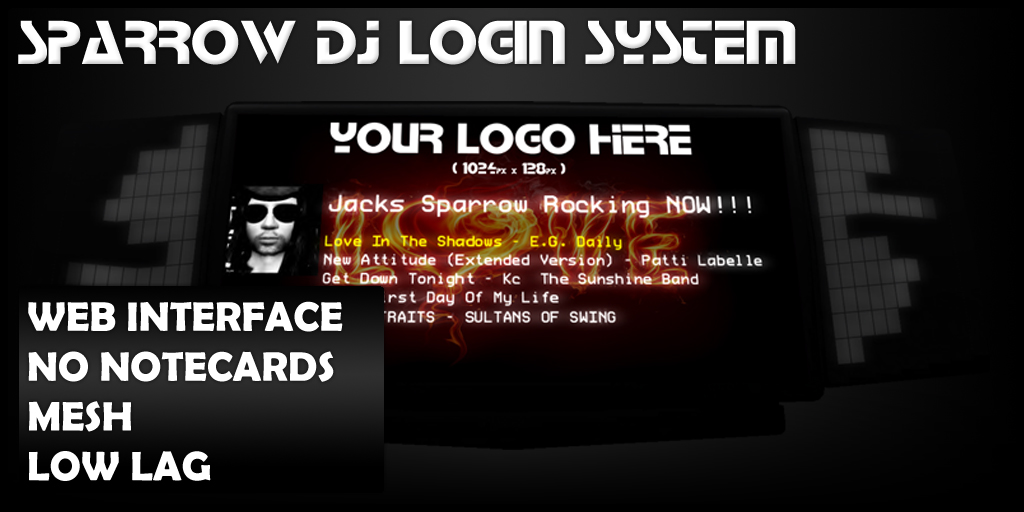
Sparrow DJ Login System

Introduction
This system will allow your dj's to login and broadcast on your club. You can control this panel via web interface. Your DJ's will be able to manage their own settings via web interface. The entire system works without notecards nor any secondlife's limitation. For the sparrow DJ's, the system contains automated stream finder, so the dj's or club's stream will be retrieved automaticaly.
For Club owners
You can set this system to accept dj logins as Everyone, Group, Access List, or none. You can setup your club's main radio stream that will be used when no dj is connected and a club's stream in case your dj's does not own stream. 
For DJs
The settings for the dj's are global, that means when you change something on one panel, all the panels will reflect the new settings. In the cases when you change stream, all you will have to do is to update 1 time your settings and all the sparrow panels will reflect them. Also you can personalize your settings by changing the name that will appear on those panels, your picture and also you can use your own wall paper. Those settings will be displayed on every club that is using our system and you will only change them once.
For Hosts
Hosts on this system can be added by 2 ways. Club owners can add hosts for the club and also dj's can add their own hosts on their settings. That means if a dj has his own personal host that follow's him/her over several places, he can add on his personal settings and the panels will allow him/her to login as well. Keep in mind that the club owners have the ability to suspend this option.
Understanding the stream selection
When a dj is trying to login to the system, the system will perform the following checks

  1. The system will check if the dj has a valid music url specified on his sparrow dj comfiguration
  2. If the system cannot find any valid url supplied by the current dj then will start looking if the DJ owns a sparrow stream, if yes will provide this stream
  3. If the DJ doesnt own any sparrow stream then the system will look if the club owner have specified a default broadcasting stream
  4. If the Club owners doesnt provide a valid club stream then the system will lookup if the club owner currently owns a sparrow stream and it will provide that stream
  5. In case all the above situations failed, the system will not log the current DJ and he/she will need to click "DJ Settings" and specify his stream.
Possible Scenarions

  • For the djs that are changing stream url often, is ideal solution as they can change their new stream at anytime without to bother the club owners.
  • For Club owners that they want to use complex solutions as half dj's to use their own stream and others to use the clubs stream.
  • Dj's that changing Hosts often. As they will change host all they will need to do is to visit the website and change the name and she/he will be able to login automated.
  • For the typo lovers, just let the system perform the comfigurations for you. Make sure that the club owner or the dj's owns a sparrow stream and let the system do the rest.

Friday, March 15, 2013

Important Updates for ShoutCast Resellers!

Dear Resellers,  
We have released the v2.00 of the Sparrow ShoutCast Affiliate Program. Please visit our Main Store to receive your updates. Best regards, 
Sparrow Industries Team

Sunday, November 4, 2012

Find your rental box with one click!

Sometimes Dj's can't remember where is their rental box located. If that happens to you just come to Sparrow Main Store and at the entrance you will find board like this. Touch it and it will give you link to teleport right on your rental box, or list of your rental boxes (if you have them more) all around Second Life!
Yours,
Sparrow Industries Team

News from Robobuddies!


From now you can write alone your payment amount when you purchase credit for Robobuddies. 
Left vendor is only DEMO  one, and in right vendor you can write any L$ amount that  you want , or choose fast buttons for 200, 400, 600 or 800 L$ credits like before.

Update for Sparrow RoboBuddies Client!

Download here!


Dear Robobuddies Users, new version of Sparrow RoboBuddies Client is ready and published with adjustments for new changes inside the Second Life. You need to uninstall old version and download and install new version from: http://apps.sparrowindustries.net